



Requesting an Alliant Software Update
Overview
Alliant releases quarterly software updates that include improvements, security enhancements, and new features. Keeping your system up to date ensures optimal performance and access to the latest features.
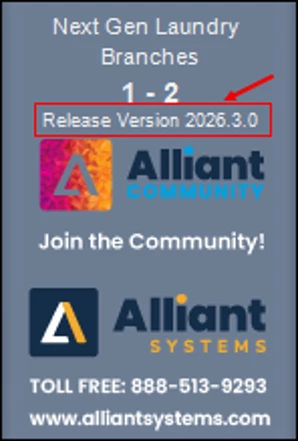
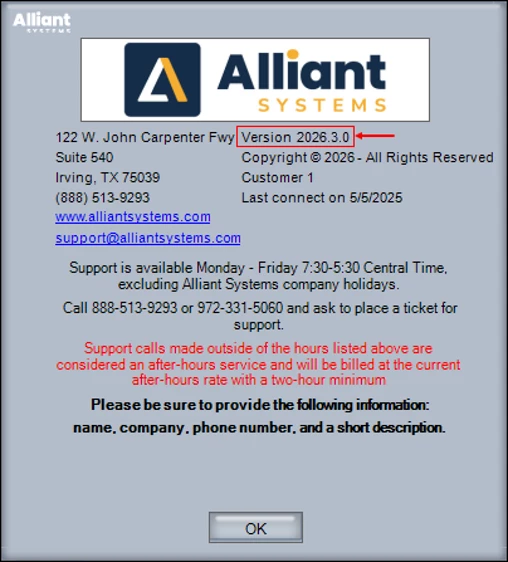
To check your current software version, use either of the following options:
Option 1: Starting with version 2026.3.0, the release version is displayed in the left sidebar.
Option 2: Go to the Business Center → About Alliant. Your software version is displayed below the Alliant Systems logo.
Customers can request a software update by contacting our Support team. Unless otherwise specified, your system will be updated to the latest available version.
Important Note: Enhancements introduced in the September 2024 build include updates to the application’s core frameworks that require new system specifications for compatibility and performance. Review the System Requirements for September 2024 and Later Builds article for more details.
Visit the Product Updates page in the Community to stay informed about software updates. You can also subscribe to the page to receive email notifications when new versions are published.
This guide explains how to request a software update and what to expect during the process.
Submitting an Update Request
To request an update, email alliant.support@texolaundry.com.
- Within two business days, you will receive an email with information about the update process and a Calendly link to schedule your update.
- Update appointments are available on a first-come, first-served basis, excluding holidays and company events.
- Appointments are available every Friday from 1 p.m. to 7 p.m. CST and every Wednesday from 4 p.m. to 7 p.m. CST.
Version Requirements for Updates
To maintain compatibility and access to new features, your system must be running a software version released within the past 15 months.
For example, as of September 2026, your system must be running a version released in June 2025 or later.
Service Update Notifications
You may receive an email from our Support team if your system requires an update for one of the following reasons:
- A bug fix relevant to your system has been released.
- A custom programming change requested by you or your team has been completed.
- Your system is running an outdated version of the software and requires an update.